How to Turn Flat Lay Apparel Photos into AI On-Model Shots: A 3-Step Practical Guide (2026 Edition)
For cross-border apparel sellers and direct-to-consumer (DTC) brands, "image quality governs click-through rate, while model realism drives conversion." Historically, securing commercial photography with Western models was notoriously slow and cost-prohibitive:
1Sourcing agency models matching target demographics ($180–$300/hr);
2Booking studio space and organizing hair, makeup, and styling teams;
3Waiting 3 to 7 business days for post-production color grading and retouching;
4In total, traditional shoots average $25 to $60 per SKU. For agile brands releasing dozens of new designs weekly to test trending styles, this represents an unsustainable overhead burden.
Today, using next-generation generative AI trained specifically on apparel datasets, a single smartphone flat-lay or ghost-mannequin photo can be converted into runway-grade on-model photography in under 3 minutes. Here is your practical 3-step blueprint.
Case Study: From Smartphone Flat Lay to Supermodel CampaignVISNOVA AI
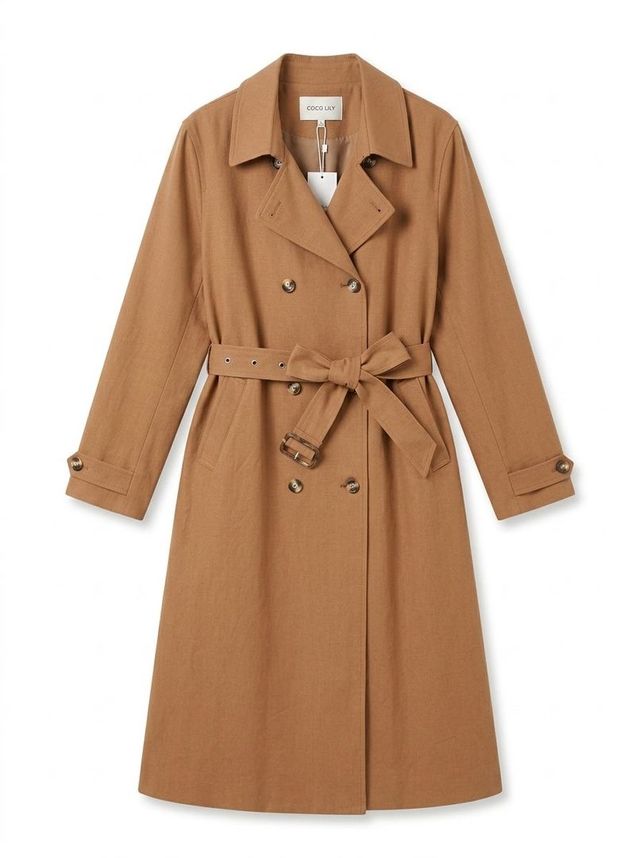 Step 1: Raw Smartphone Flat-Lay Photo
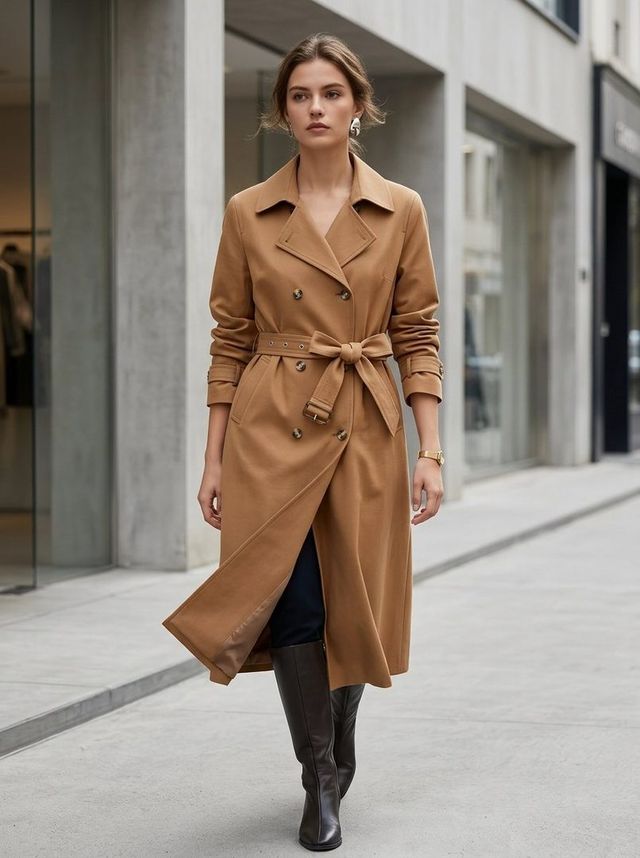 Step 3: AI Renders Western Supermodel Try-On in 30 Seconds
Step 1: Capture Clean Source Photos (Smartphone Ready)VISNOVA AI
Even with advanced AI engines, source photo clarity directly influences output precision. Keep these three best practices in mind:
Clean Background: Lay the garment flat on a light-colored neutral floor, clean tabletop, or hang it against a plain white wall on a ghost mannequin.
Diffused Lighting: Avoid harsh directional spotlights that create heavy dark shadows. Soft ambient daylight from a window or an overhead ring light delivers ideal results.
Top-Down Perspective: Keep your phone lens perpendicular to the garment, pointing straight down at a 90-degree angle to ensure symmetrical collars, sleeves, and hemline proportions.
Upload your source photo into the Visnova dashboard and configure your parameters to match your target marketplace:
Select Model Demographics & Silhouette:
- North America & Europe: Blonde or brunette Caucasian fashion models, athletic builds, or plus-size (curvy) demographics.
- Latin America: Warm honey/olive skin tones with expressive, vibrant features.
- Middle East & Global Modest Fashion: Dignified styling aligned with regional cultural standards.
Choose Commercial Studio or Lifestyle Setting:
- Hero Image: Select Pure Studio White (RGB 255) for instant Amazon, SHEIN, and Temu compliance.
- Carousel Slides: Select Urban Streetwear, Parisian Sidewalk Café, or Tropical Resort Beach.
Step 3: One-Click Generation and Multi-Scene Asset ExportVISNOVA AI
Once triggered, the engine performs 3D physical cloth simulation, anatomical fitting, and high-frequency texture rendering within 30 to 60 seconds:
1Verify Fabric & Cut Fidelity: Zoom in to confirm that neckline tailoring, stitch lines, buttons, and graphics precisely match the physical sample.
2Multi-Demographic Variants: Generate Caucasian, Black, and Latina model variations with a single click to localize listings across different global storefronts.
3Download Full Commercial Asset Packs: Export ready-to-publish 3000x4000 high-resolution image bundles without any need for secondary Photoshop retouching.
Critical Pitfalls: Selecting the Right Fashion AI EngineVISNOVA AI
Not all AI image generators are built for fashion commerce:
❌ Avoid Generic Art Models (e.g., Midjourney): Generic models hallucinate collar shapes, alter button counts, and redraw patterns, resulting in product mismatches that inflate customer return rates.
✅ Use Specialized Fashion E-Commerce Engines (e.g., Visnova): Engineered with strict garment-consistency locking and full commercial royalty-free licensing to ensure listing compliance and customer satisfaction.
⚡ Create a draft · results vary by input
Create a fashion visual draft with AI
Upload garment imagery you are authorized to use. Review the result and platform rules before publishing.